Lab-2-6
(2.5% of the course mark)
React Props Lab
- The React Props Lab is designed to provide an in-depth, hands-on learning experience focused on the concept of props (short for properties) in React. Props are essential for passing data and functionality between components, enabling dynamic and reusable UI components. This lab will cover the basics of props, how to pass and access them, and best practices for managing data flow in a React application.
Lab objectives
-
Learn what props are and their role in React components.
-
Explore how to pass data as props to child components.
-
Access and use props within functional-based components.
-
Implement default props to handle missing prop values.
Create basic React app
- On VSCode, open the terminal and enter the following command:
npm create vite@latest react-props-app -- --template react
- Clean up the project by doing the following:
- In the src folder, update main.jsx and remove the following code:
import "./index.css";
- In the src folder, update App.jsx and overwrite the contents by copying the following code:
// Developer:
// Purpose:

function App() {
  return <h1>First React App</h1>;
}

export default App;
-
Delete the following:
-
Folder:
- src/assets
-
File:
-
src/App.css
-
src/index.css
-
-
- Open your browser and navigate to: http://localhost:5173, changes should be displayed immediately.
-
Ensure that you are able to see the latest changes in the browser after the project clean up.
-
Do not not proceed to the next step until you have verified that the project is still working.
Add Tailwind
- In the terminal, install Tailwind and Vite plugin by running the following command:
npm install -D tailwindcss @tailwindcss/vite
- In the root of the app, update vite.config.js and add the following code:
import { defineConfig } from "vite";
import react from "@vitejs/plugin-react";
import tailwindcss from "@tailwindcss/vite";

export default defineConfig({
  plugins: [react(), tailwindcss()],
});
- In the src folder, create a file named: style.css and add the following code:
@import "tailwindcss";
- In the src folder, update main.jsx with the following css import statements:
import "./style.css";
Ensure this file has no other CSS imports besides the one above, as doing so may cause inconsistencies in the output.
- In the src folder, update App.jsx with the following code:
function App() {
  return (
    <div className="bg-white text-gray-800 font-sans">
      <header className="border-b border-gray-200 px-6 py-4 flex items-center justify-between">
        <span className="text-xl font-bold text-gray-900">
          Fullstack Development
        </span>
        <nav className="flex gap-6 text-sm text-gray-500">
          <a href="#" className="hover:text-gray-900">
            Home
          </a>
          <a href="#" className="hover:text-gray-900">
            About
          </a>
          <a href="#" className="hover:text-gray-900">
            Contact
          </a>
        </nav>
      </header>

      <section className="bg-gray-50 px-6 py-24 text-center">
        <h1 className="text-5xl font-bold text-gray-900 mb-4">
          Welcome to Fullstack Development
        </h1>
        <p className="text-lg text-gray-500 mb-8 max-w-xl mx-auto">
          Our Full Stack Development Program provides you with both a
          comprehensive knowledge of the different technologies used to build
          full stack applications and the practical skills you need to design
          and develop full stack applications.
        </p>
        <div className="flex justify-center gap-4">
          <a
            href="#"
            className="bg-gray-900 text-white px-6 py-3 rounded-lg text-sm font-medium hover:bg-gray-700"
          >
            Get Started
          </a>
          <a
            href="#"
            className="border border-gray-300 text-gray-700 px-6 py-3 rounded-lg text-sm font-medium hover:bg-gray-100"
          >
            Learn More
          </a>
        </div>
      </section>

      <main className="max-w-5xl mx-auto px-6 py-20">
        <h2 className="text-2xl font-bold text-gray-900 mb-10 text-center">
          Courses
        </h2>
        <div className="grid md:grid-cols-3 gap-6">
          <div className="border border-gray-200 rounded-xl p-6">
            <div className="w-10 h-10 bg-blue-100 rounded-lg mb-4"></div>
            <h3 className="font-semibold text-gray-900 mb-2">
              Programming Fundamentals
            </h3>
            <p className="text-sm text-gray-500 leading-relaxed">
              Our Programming Fundamentals course provides a practical
              introduction to full stack development for those who have no prior
              experience in programming or computer science.
            </p>
          </div>

          <div className="border border-gray-200 rounded-xl p-6">
            <div className="w-10 h-10 bg-green-100 rounded-lg mb-4"></div>
            <h3 className="font-semibold text-gray-900 mb-2">
              Front-end Development
            </h3>
            <p className="text-sm text-gray-500 leading-relaxed">
              Our Front-end Development course helps you get the knowledge and
              skills you need to be able to build the front-end of websites and
              web applications.
            </p>
          </div>

          <div className="border border-gray-200 rounded-xl p-6">
            <div className="w-10 h-10 bg-purple-100 rounded-lg mb-4"></div>
            <h3 className="font-semibold text-gray-900 mb-2">
              Back-end Development
            </h3>
            <p className="text-sm text-gray-500 leading-relaxed">
              Our Back-end Development course focuses on teaching you the
              back-end development principles and skills you need to create
              server-side applications that support and power front-end
              applications.
            </p>
          </div>
        </div>
      </main>

      <footer className="border-t border-gray-200 px-6 py-8 text-center text-sm text-gray-400">
        <p>© 2025 Fullstack Development. All rights reserved.</p>
      </footer>
    </div>
  );
}

export default App;
In JSX, the attribute used to apply CSS classes is className instead of the standard HTML class attribute. This is because class is a reserved keyword in JavaScript (Used for defining classes in ES6) and since JSX is a syntax extension of JavaScript, using class directly would cause syntax errors.
- In the terminal, run the following command:
npm run dev
- Take a screenshot of the browser output and save it as react-tailwind.png.
Create components
-
Inside the src folder, create a folder named: components.
-
Inside the components folder, create a file named: Header.jsx and add the following code:
// Developer:
// Purpose:

function Header() {
  return (
    <header className="border-b border-gray-200 px-6 py-4 flex items-center justify-between">
      <span className="text-xl font-bold text-gray-900">
        Fullstack Development
      </span>
      <nav className="flex gap-6 text-sm text-gray-500">
        <a href="#" className="hover:text-gray-900">
          Home
        </a>
        <a href="#" className="hover:text-gray-900">
          About
        </a>
        <a href="#" className="hover:text-gray-900">
          Contact
        </a>
      </nav>
    </header>
  );
}

export default Header;
- Inside the components folder, create a file named: Hero.jsx and add the following code:
// Developer:
// Purpose:

function Hero() {
  return (
    <section className="bg-gray-50 px-6 py-24 text-center">
      <h1 className="text-5xl font-bold text-gray-900 mb-4">
        Welcome to Fullstack Development
      </h1>
      <p className="text-lg text-gray-500 mb-8 max-w-xl mx-auto">
        Our Full Stack Development Program provides you with both a
        comprehensive knowledge of the different technologies used to build full
        stack applications and the practical skills you need to design and
        develop full stack applications.
      </p>
      <div className="flex justify-center gap-4">
        <a
          href="#"
          className="bg-gray-900 text-white px-6 py-3 rounded-lg text-sm font-medium hover:bg-gray-700"
        >
          Get Started
        </a>
        <a
          href="#"
          className="border border-gray-300 text-gray-700 px-6 py-3 rounded-lg text-sm font-medium hover:bg-gray-100"
        >
          Learn More
        </a>
      </div>
    </section>
  );
}

export default Hero;
- Inside the components folder, create a file named: Content.jsx and add the following code:
// Developer:
// Purpose:

function Content() {
  return (
    <main className="max-w-5xl mx-auto px-6 py-20">
      <h2 className="text-2xl font-bold text-gray-900 mb-10 text-center">
        Courses
      </h2>
      <div className="grid md:grid-cols-3 gap-6">
        <div className="border border-gray-200 rounded-xl p-6">
          <div className="w-10 h-10 bg-blue-100 rounded-lg mb-4"></div>
          <h3 className="font-semibold text-gray-900 mb-2">
            Programming Fundamentals
          </h3>
          <p className="text-sm text-gray-500 leading-relaxed">
            Our Programming Fundamentals course provides a practical
            introduction to full stack development for those who have no prior
            experience in programming or computer science.
          </p>
        </div>

        <div className="border border-gray-200 rounded-xl p-6">
          <div className="w-10 h-10 bg-green-100 rounded-lg mb-4"></div>
          <h3 className="font-semibold text-gray-900 mb-2">
            Front-end Development
          </h3>
          <p className="text-sm text-gray-500 leading-relaxed">
            Our Front-end Development course helps you get the knowledge and
            skills you need to be able to build the front-end of websites and
            web applications.
          </p>
        </div>

        <div className="border border-gray-200 rounded-xl p-6">
          <div className="w-10 h-10 bg-purple-100 rounded-lg mb-4"></div>
          <h3 className="font-semibold text-gray-900 mb-2">
            Back-end Development
          </h3>
          <p className="text-sm text-gray-500 leading-relaxed">
            Our Back-end Development course focuses on teaching you the back-end
            development principles and skills you need to create server-side
            applications that support and power front-end applications.
          </p>
        </div>
      </div>
    </main>
  );
}

export default Content;
- Inside the components folder, create a file named: Footer.jsx and add the following code:
// Developer:
// Purpose:

function Footer() {
  return (
    <footer className="border-t border-gray-200 px-6 py-8 text-center text-sm text-gray-400">
      <p>
        © {new Date().getFullYear()} Fullstack Development. All rights reserved.
      </p>
    </footer>
  );
}

export default Footer;
- Inside the src folder, update App.jsx and add the following code:
import Header from "./components/Header";
import Hero from "./components/Hero";
import Content from "./components/Content";
import Footer from "./components/Footer";

function App() {
  return (
    <div className="bg-white text-gray-800 font-sans">
      <Header></Header>
      <Hero></Hero>
      <Content></Content>
      <Footer></Footer>
    </div>
  );
}

export default App;
- Open your browser and navigate to: http://localhost:5173, changes should be displayed immediately. Take a screenshot and save it as react-component.png.
Create props
- Inside the components folder, update Header.jsx and add the following code:
// Developer:
// Purpose:

function Header(props) {
  return (
    <header className="border-b border-gray-200 px-6 py-4 flex items-center justify-between">
      <span className="text-xl font-bold text-gray-900">
        {props.data.title}
      </span>
      <nav className="flex gap-6 text-sm text-gray-500">
        {props.data.navs.map((nav, index) => (
          <a key={index} href="#" className="hover:text-gray-900">
            {nav}
          </a>
        ))}
      </nav>
    </header>
  );
}

export default Header;
- Inside the components folder, update Hero.jsx and add the following code:
// Developer:
// Purpose:

function Hero(props) {
  return (
    <section className="bg-gray-50 px-6 py-24 text-center">
      <h1 className="text-5xl font-bold text-gray-900 mb-4">
        {props.data.title}
      </h1>
      <p className="text-lg text-gray-500 mb-8 max-w-xl mx-auto">
        {props.data.description}
      </p>
      <div className="flex justify-center gap-4">
        {props.data.ctos.map((cto, index) => (
          <a key={index} href={cto.href} className={cto.className}>
            {cto.text}
          </a>
        ))}
      </div>
    </section>
  );
}

export default Hero;
- Inside the components folder, update Content.jsx and add the following code:
// Developer:
// Purpose:

function Content(props) {
  return (
    <main className="max-w-5xl mx-auto px-6 py-20">
      <h2 className="text-2xl font-bold text-gray-900 mb-10 text-center">
        {props.data.title}
      </h2>
      <div className="grid md:grid-cols-3 gap-6">
        {props.data.courses.map((course, index) => (
          <div key={index} className="border border-gray-200 rounded-xl p-6">
            <div className={course.style}></div>
            <h3 className="font-semibold text-gray-900 mb-2">{course.title}</h3>
            <p className="text-sm text-gray-500 leading-relaxed">
              {course.description}
            </p>
          </div>
        ))}
      </div>
    </main>
  );
}

export default Content;
- Inside the components folder, update Footer.jsx and add the following code:
// Developer:
// Purpose:

function Footer({
  text = `© ${new Date().getFullYear()} Fullstack Development. All rights reserved.`,
}) {
  return (
    <footer className="border-t border-gray-200 px-6 py-8 text-center text-sm text-gray-400">
      <p>{text}</p>
    </footer>
  );
}

export default Footer;
- Inside the src folder, update App.jsx and add the following code:
import Header from "./components/Header";
import Hero from "./components/Hero";
import Content from "./components/Content";
import Footer from "./components/Footer";

const appData = {
  header: {
    title: "Fullstack Development",
    navs: ["Home", "About", "Contact"],
  },
  hero: {
    title: "Welcome to Fullstack Development",
    description:
      "Our Full Stack Development Program provides you with both a comprehensive knowledge of the different technologies used to build full stack applications and the practical skills you need to design and develop full stack applications.",
    ctos: [
      {
        text: "Get Started",
        className:
          "bg-gray-900 text-white px-6 py-3 rounded-lg text-sm font-medium hover:bg-gray-700",
        href: "#",
      },
      {
        text: "Learn More",
        className:
          "border border-gray-300 text-gray-700 px-6 py-3 rounded-lg text-sm font-medium hover:bg-gray-100",
        href: "#",
      },
    ],
  },
  content: {
    title: "Courses",
    courses: [
      {
        title: "Programming Fundamentals",
        description:
          "Our Programming Fundamentals course provides a practical introduction to full stack development for those who have no prior experience in programming or computer science.",
        style: "w-10 h-10 bg-blue-100 rounded-lg mb-4",
      },
      {
        title: "Front-end Development",
        description:
          "Our Front-end Development course helps you get the knowledge and skills you need to be able to build the front-end of websites and web applications.",
        style: "w-10 h-10 bg-green-100 rounded-lg mb-4",
      },
      {
        title: "Back-end Development",
        description:
          "Our Back-end Development course focuses on teaching you the back-end development principles and skills you need to create server-side applications that support and power front-end applications.",
        style: "w-10 h-10 bg-purple-100 rounded-lg mb-4",
      },
    ],
  },
};

function App() {
  return (
    <div className="bg-white text-gray-800 font-sans">
      <Header data={appData.header}></Header>
      <Hero data={appData.hero}></Hero>
      <Content data={appData.content}></Content>
      <Footer></Footer>
    </div>
  );
}

export default App;
- Open your browser and navigate to: http://localhost:5173, changes should be displayed immediately. Take a screenshot and save it as react-props.png.
Convert ejs to React
- In Lab-1-5 you built a price comparison app using ejs. Convert the ejs app to a React app that uses components and props. The app name should be react-ejs-to-react-app. Feel free to use the CSS framework of your choice.
Submission
- Create a folder named submit.
Delete the node_modules folder on any app that you are submitting.
-
Copy the react-props-app, react-ejs-to-react-app and all the screenshots (react-tailwind.png, react-component.png and react-props.png) to the submit folder.
-
Create a zip file of the submit folder.
-
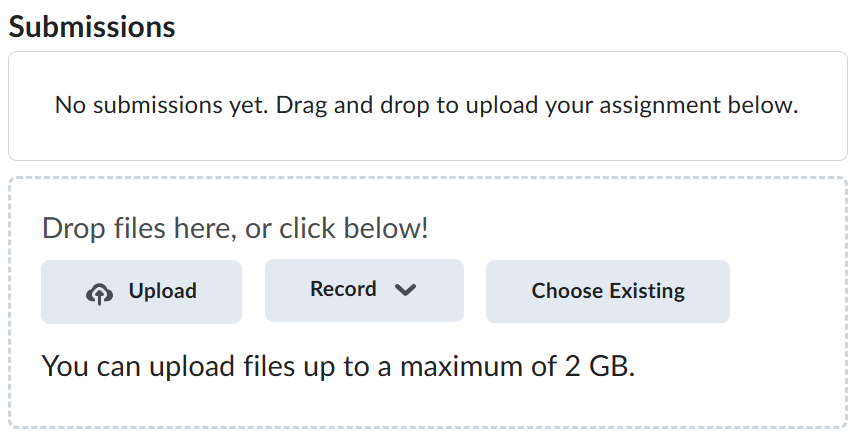
Navigate back to where the lab was originally downloaded, there should be a Submissions section (see below) where the zip file can be uploaded.