Lab-2-1
(2.5% of the course mark)
JS Modules Lab
- In this lab, you will explore the concept of JavaScript modules, a crucial aspect of modern JavaScript development. Modules help in organizing code, promoting reusability, and reducing complexity. You will learn different module systems, such as ES6 and CommonJS modules, and how to use them effectively in your projects.
Lab objectives
-
Understand the importance of modular code in JavaScript development.
-
Learn the syntax and usage of ES6 and CommonJS modules.
Create basic Node.js app
-
Open VSCode and create a folder named Node-Modules-App.
-
Open the terminal and change the directory to Node-Modules-App.
-
Initialize the app by running the following command:
npm init -y
- Install uuid by running the following command:
npm install uuid
This npm package support both ES6 and CommonJS modules.
- In the root of the Node-Modules-App folder, create a folder named: lib. This folder will be used to store the modules.
Add CommonJS
- Create a file named: CommonJS.js and add the following code:
// Developer:
// Purpose:

const uuid = require("uuid");

console.log(`UUID Version 1 (Time-based): ${uuid.v1()}`);
console.log(`UUID Version 4 (Random): ${uuid.v4()}`);
-
Save the changes.
-
In the terminal, run the following command:
node CommonJS.js
-
Take a screenshot and save it as CommonJS01.png.
-
Navigate to the lib folder, create a file named: UUIDUtilsCommonJS.js and add the following code:
// Developer:
// Purpose:

const uuid = require("uuid");
-
Update UUIDUtilsCommonJS and create a function named: generateUUID(version), where version is a number. The function shall implement the following logic:
-
If version is equal to 1, return the value of uuid.v1().
-
If version is equal to 4, return the value of uuid.v4().
-
Otherwise return an empty string.
-
-
At the end of file, enter the following code:
module.exports = { generateUUID };
- Overwrite or comment out all the contents of CommonJS.js and add the following code:
const UUIDUtilsCommonJS = require("./lib/UUIDUtilsCommonJS");
- Implement the following coding tasks:
- Display the text: "CommonJS module demo…".
The generateUUID function from the UUIDUtilsCommonJS module, can be invoked like this: UUIDUtilsCommonJS.generateUUID(version), where version is any valid number.
-
Call generateUUID function with version equal to 1 and display the results.
-
Call generateUUID function with version equal to 4 and display the results.
-
Call generateUUID function with version equal to anything other than 1 or 4 and display the results.
-
Save the changes.
-
In the terminal, run the following command:
node CommonJS.js
- Take a screenshot of the terminal output and save it as CommonJS02.png.
Add ES6
- Create a file named: ES6.js and add the following code:
// Developer:
// Purpose:

import { v1, v4 } from "uuid";

console.log(`UUID Version 1 (Time-based): ${v1()}`);
console.log(`UUID Version 4 (Random): ${v4()}`);
-
Save the changes.
-
In the terminal, run the following command:
node ES6.js
-
Take a screenshot and save it as ES601.png.
-
Navigate to the lib folder, create a file named: UUIDUtilsES6.js and the following code:
// Developer:
// Purpose:

import { v1, v4 } from "uuid";
-
Update UUIDUtilsES6.js and create a function named: generateUUID(version), where version is a number. The function shall implement the following logic:
-
If version is equal to 1, return the value of uuid.v1().
-
If version is equal to 4, return the value of uuid.v4().
-
Otherwise return an empty string.
-
-
At the end of file, enter the following code:
export { generateUUID };
- Overwrite or comment out all the contents of ES6.js and enter the following code:
import { generateUUID } from "./UUIDUtilsES6.js";
- Implement the following coding tasks:
- Display the text: "ES6 module demo…".
The generateUUID function from the UUIDUtilsES6 module, can be invoked like this: generateUUID(version), where version is any valid number.
-
Call generateUUID function with version equal to 1 and display the results.
-
Call generateUUID function with version equal to 4 and display the results.
-
Call generateUUID function with version equal to anything other than 1 or 4 and display the results.
-
Save the changes.
-
In the terminal, run the following command:
node ES6.js
- Take a screenshot of the terminal output and save it as ES602.png.
Submission
- Create a folder named submit.
Delete the node_modules folder on any app that you are submitting.
-
Copy the Node-Modules-App and all the screenshots (CommonJS01, CommonJS02, ES601.png and ES602.png) to the submit folder.
-
Create a zip file of the submit folder.
-
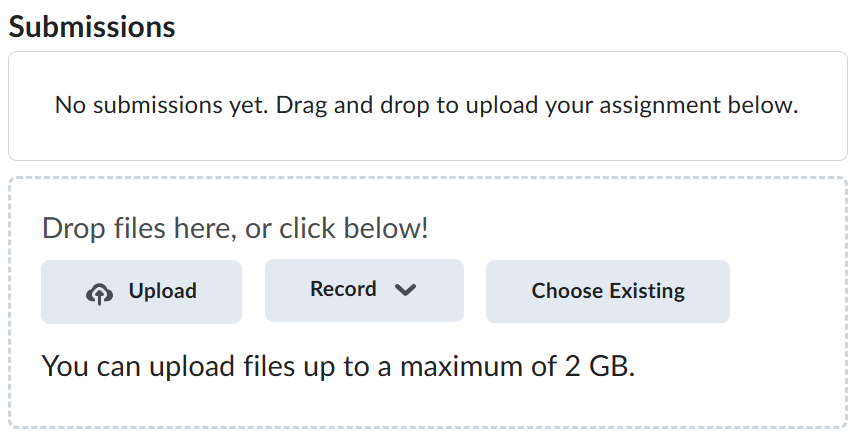
Navigate back to where the lab was originally downloaded, there should be a Submissions section (see below) where the zip file can be uploaded.